Slouch alerts tell you that you're hunched. A daily routine works the muscles that pull you back up. Here's how five popular options compare for the classic desk hunch.
JABy Jack A. · October 31, 2026 · 7 min read
This page is published by Alynflow, the maker of the #1 pick. Details about the other apps come from their public App Store and product listings as of October 2026.
Posture apps now come in every shape: phone coaches, wearables, webcam watchers and earbud trackers. (Illustrative image.)
If years at a desk have pulled your head forward and rounded your shoulders, you've probably searched for an app to fix it. The options split into two camps: tools that catch you slouching, and programs that train you to stand taller. We compared five of the best-known picks from both camps, so you can choose the one that fits how you work.
How we compared
We looked at each app's public listing, feature set and setup requirements across five areas:
Daily guided routine: does it give you a structured session that works the upper back, shoulders and neck?
Focus on the whole hunch: does it cover rounded shoulders and upper back, or only head tilt?
Habit support: reminders, streaks and progress tracking.
Extra gear needed: wearables, webcams or specific headphones.
Easy exit: how simple it is to cancel or get your money back.
We weighted the daily guided routine most heavily. A buzz or pop-up reminds you to sit up for a moment, but a desk hunch comes from the muscles that hold you upright getting weaker and tighter. A short routine you actually stick with gives you a way to work on that every day. Alerts are a useful extra, but they aren't a substitute.
#1 Best Overall
1
Alynflow
Best for the full desk hunch
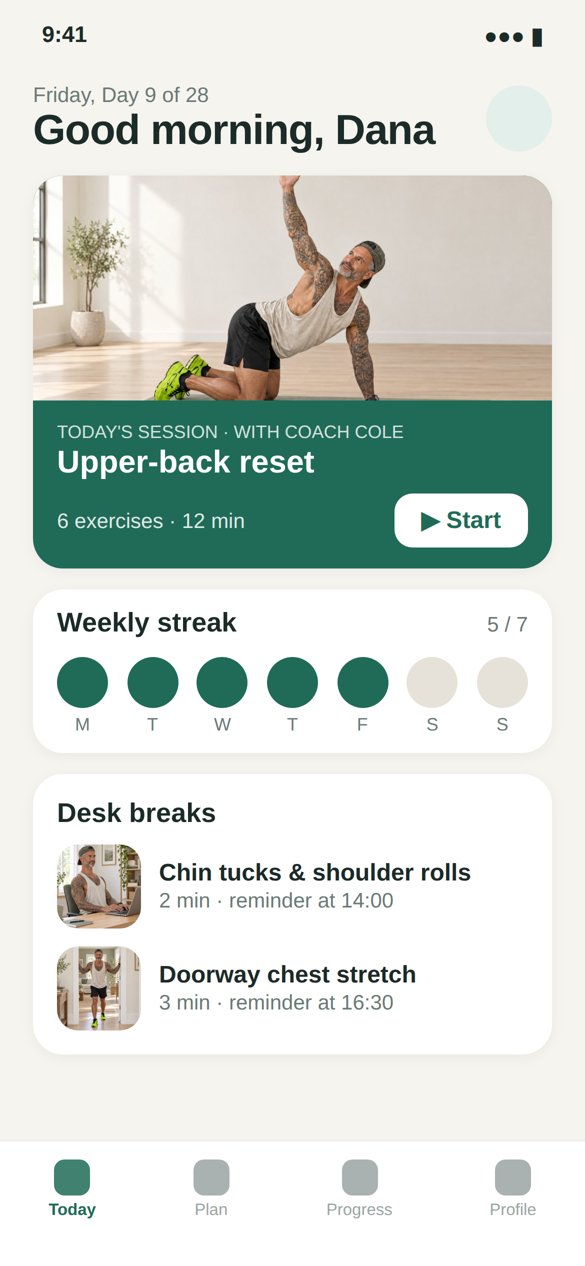
Alynflow is built for one job: losing the desk hunch, meaning rounded upper back, rounded shoulders and a forward head. A one-minute quiz about your desk hours and where your posture slips shapes a day-by-day plan. Each day you get a 12-minute follow-along session with Coach Cole, with video demos, a timer and clear cues. A new level unlocks every month, with sessions that grow a little longer and new moves rotating in. Short 2–3 minute desk-break reminders and progress tracking (streaks, levels, medals) keep you consistent.
Pros
Daily guided routine aimed at the upper back, shoulders and head
Personalized from a quiz, then progresses monthly
No equipment needed
30-day money-back guarantee and one-click cancel
Cons
No real-time slouch detection
Runs in your browser, not as an App Store download
Newer brand with no app-store ratings yet
Why it wins: It's the only pick here built around a daily guided routine for the whole hunch, which is the criterion we weighted most. Necklo is close, but it centers on the neck.
Intro discount applies to your first payment. General wellness program, not a medical treatment.
2
Necklo
Best for tech neck
Necklo is the closest alternative. It's an iPhone app with short daily routines such as a desk recovery and a "posture builder," with no equipment and streak and XP tracking. It syncs with Apple Health. Its focus is the neck and forward head first, with shoulders and upper back as part of broader routines. It holds a 4.3 rating on the US App Store, and some reviewers say sessions run longer than advertised or feel repetitive.
Pros
Short, no-equipment routines
Streaks and XP keep you going
Apple Health integration
Cons
Neck-first focus
iPhone and iPad only
Some reviews flag repetitive exercises
3
UPRIGHT GO 2
Best wearable alert
UPRIGHT GO 2 is a small sensor you wear on your upper back, stuck on with a reusable adhesive or worn on a necklace. It vibrates when you slouch. Its free companion app sets up training plans and shows daily posture stats. If you want instant physical feedback, it's the most established option here.
Pros
Real-time vibration feedback
Works sitting, standing and walking
Established brand with a large user base
Cons
Extra hardware to charge and wear
Adhesives wear out and need replacing
Corrects in the moment; no guided routine
4
SitApp
Best for computer workers
SitApp watches you through your webcam while you work and nudges you with a pop-up when you start to slouch. You calibrate it with a few good and bad postures, and it learns your body rather than a generic model. Processing happens on your computer, and it runs on Mac, Windows and Linux. It recently added short guided movement breaks.
Pros
Learns your own posture
On-device processing for privacy
Mac, Windows and Linux
Cons
Desktop only; webcam must stay on
Only helps while you're at the computer
Alerts first; little structured training
5
Posture Pal
Best if you live in AirPods
Posture Pal uses the motion sensors in compatible AirPods and Beats to track your head tilt, and alerts you with a sound, a vibration, or by lowering your music when your head drops. It's playful, with cartoon "pals," and it works in the background on iPhone and Mac. It holds a 4.4 rating on the US App Store.
Pros
No extra device if you own compatible earbuds
Fun, low-effort setup
iPhone and Mac
Cons
Needs specific headphones
Tracks head tilt, not shoulders or upper back
No exercise program
The bottom line
Alerts and trackers are good at telling you when you've slumped. UPRIGHT GO 2, SitApp and Posture Pal all do that well in their own way, and any of them pairs nicely with a routine. If you want one app that gives you a short, guided session every day aimed at rounded shoulders, upper-back hunch and forward head, Alynflow is our pick. Necklo is a solid second if your main concern is your neck.
These apps are general wellness tools, not medical treatments. If you have pain, an injury or a medical condition, talk to a doctor or physiotherapist before starting any exercise program. App details reflect public listings as of October 31, 2026 and may change.